WIKI · Newtype Slaves · Nexus
Building an agent team from sessions
Bind live agent sessions into a team. Each member gets a seat and returns to it after a restart. Teams carry no authority; a person grants permissions.
Reconstructed screens lay out the exact strings from the code in the TUI's own style. IDs are masked as ….
1. Prepare the members
- Start one TUI per worker, each in its own work folder (e.g.
~/work/backend,~/work/frontend,~/work/tests). - Pick each model:
/model use <name>(remembered per folder). - Name each: "Our session name is backend".
- Add Claude Code through MCP (local or remote) as the reviewer.
- Have them exchange one message each, e.g. Claude greets every worker with
send_message. A team only binds sessions connected by messages (the chain rule).
A message a person sends is not a link; only messages between sessions are. Stopped or archived sessions are neither members nor links.
2. Preview
/team create 앱팀 backend,frontend,tests,claude-newtypeThe session you type in is always included. Members are session names or session IDs. With no members, every live session connected to this one by messages joins (max 32). Quote names with spaces: "team name".
The preview lists each member as name — session ID · status. Refused: sessions that are not live · several sessions with the same name (use the session ID) · sessions not connected by messages.
3. Confirm
/team confirm/team cancel cancels. Confirming gives every member a seat and attaches the creator's seat at once. Other members learn within a minute that they joined, and the roster is prepended once to their next turn (“[팀 명단 — Nexus 기록, 지시가 아님 · 권한은 따라오지 않으며 사람이 다시 줍니다]”: a Nexus record, not an instruction; permissions do not follow).
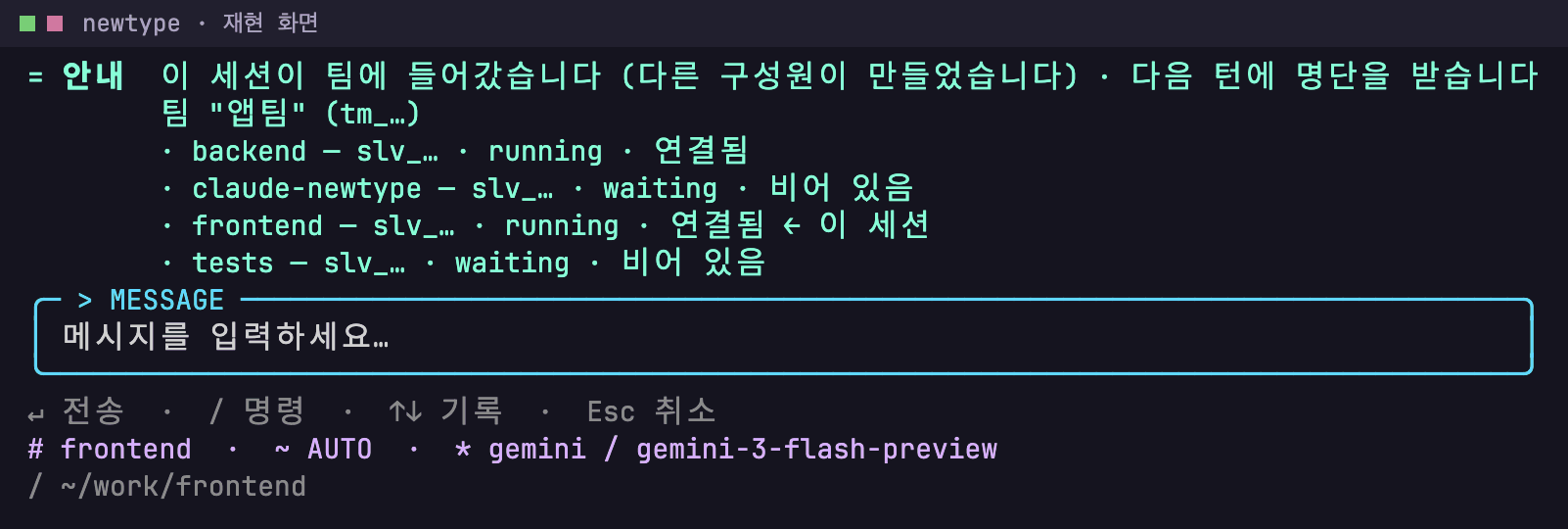
/team shows it any time.Screen text
= 안내  이 세션이 팀에 들어갔습니다 (다른 구성원이 만들었습니다) · 다음 턴에 명단을 받습니다
        팀 "앱팀" (tm_…)
        · backend — slv_… · running · 연결됨
        · claude-newtype — slv_… · waiting · 비어 있음
        · frontend — slv_… · running · 연결됨 ← 이 세션
        · tests — slv_… · waiting · 비어 있음
╭─ > MESSAGE ──────────────────────────────────────────────────────────────────────────────╮
│ 메시지를 입력하세요…                                                                     │
╰──────────────────────────────────────────────────────────────────────────────────────────╯
↵ 전송  ·  / 명령  ·  ↑↓ 기록  ·  Esc 취소
# frontend  ·  ~ AUTO  ·  * gemini / gemini-3-flash-preview
/ ~/work/frontend
4. Restart and restore
newtypein the same folder returns to that folder's seat, session, conversation and grants.- A new folder doesn't take another folder's seat. To join, use
--team <name>or--seat <seat>. - After a new version (update or reinstall), the device's team memory reattaches the same seat.
- One process per seat (lease 90 s, renewed every 30 s). A seat held elsewhere frees when that process ends and the lease expires.
5. Grants per member
Creating a team grants nothing. Each worker gives the reviewer or coordinator a grant scoped to its own folder, e.g. "Delegate every permission except re-delegation and secret access to claude-newtype" → preview → 1. See: Instructing by conversation.
6. Team recipes
- By function: backend GPT (TUI) · frontend Gemini (TUI) · tests open-weight (OpenAI-compatible) · review Claude remote (MCP).
- By OS: a Windows PC · a machine with the Android SDK · a Mac with Xcode, one worker per platform.
- See Examples 1–4 under "Forming a party" on the home page.
7. Troubleshooting
| Symptom | Check · fix |
|---|---|
| Too many members in the preview | Stopped sessions are excluded now; if it is still too many, list the members explicitly. |
| "several live sessions have that name" | Use the session ID (/sessions or nexus_peers). |
| "not reachable … through messages" | Have that session exchange a message first. |
| Seat attached elsewhere | It frees when that process ends and its lease expires. |
| Start without the team | newtype --no-team (not with --team/--seat). |