WIKI · Newtype Slaves · Nexus
TUI command reference
Every slash command, key and approval prompt in the Newtype Slaves TUI, plus the newtype CLI commands and flags for the terminal. The TUI itself is in Korean.
Reconstructed screens lay out the exact strings from the code in the TUI's own style. IDs are masked as ….
Start screen and how to read it
The bottom lines of the TUI are the status line: # conversation name · ~ mode · * model, then / work folder.
Every transcript row starts with a marker and a two-letter Korean label.
| Marker | Meaning |
|---|---|
> 입력 | what you typed |
* 답변 | the model's answer |
~ 생각 / ~ 생성 | thinking status / answer being generated |
+ 도구 / $ 실행 | tool call / shell command (run_command) |
+ 완료 / ! 오류 | tool result [OK] 완료 / [FAIL] 실패 |
| 출력 | shell output (first 16 lines) |
? 승인 | approval record (approved · refused · auto-approved) |
= 안내 / @ 알림 | TUI notice / background job notice |
/help — every command
Typing / opens the command menu: ↑↓ select · Tab complete · Enter run · Esc close.
Conversations
| Command | What it does |
|---|---|
/new | Start a new conversation. The previous one is kept. |
/clear | Clear the screen and start a new conversation. |
/name <name> | Name the current conversation (shown in the status line, max 60 characters). /name shows it, /name - clears it; /rename is the same. |
/sessions [page] | Local conversations on this device (20 per page, * = current). Not the Nexus list. |
/load <ID> | Switch to that conversation. Work folder, mode and permissions are not changed. |
/session | Current conversation ID and session defaults (model, tokens, TTL). /session set changes tokens/TTL from the next start. |
/compact | Summarize and continue (model call, may cost). The original is kept. |
/export [md|json] | Preview the conversation (not saved to a file). |
/rewind <turns to keep> [--confirm] | Keep only the first N turns. Without --confirm it only shows the confirmation text. Files and usage are not rolled back. |
/memory · /init | Ask for a memory summary / ask for an AGENTS.md (normal model turns). |
/plan [file.md|work|off] | Pin a plan file · work-table checks · show · off. |
/version · /quit | Show version / quit (/exit, /q too). |
Name it first — /new, then /name 결제 모듈 리뷰 — and the name is saved once the first message creates the conversation.
Modes — auto and self-conscious
| Command | What it does |
|---|---|
/mode | Show the current mode. |
/mode auto | Default. In turns you typed, local file/shell/memory confirmations are auto-approved. Secret, Nexus, custody and external tools still ask. |
/mode self-conscious | Keeps going until the goal is met (up to 12 continuations per typed turn). Esc stops. /self, /sc too. |
/mode self-conscious is saved, so the next start uses it too.
Modes cannot be switched by conversation; only a typed command (or the --mode flag) turns them on.
Model profiles
| Command | What it does |
|---|---|
/model | Current model and profiles. |
/model add [name] | Guided setup: name → provider (openai · responses · anthropic · gemini; open-weight from 0.20261005.3) → model → endpoint → API key (hidden prompt) → switch now? Esc cancels without saving. |
/model use <name> | Switch between turns; the conversation stays. Remembered per folder. |
/model key <name> | Replace the API key. |
/model remove <name> | Delete the profile and its key (type the name again to confirm). |
API keys live only in the macOS Keychain, never on screen, in files or in logs.
/model add gpt
# provider: openai · endpoint: https://api.openai.com/v1/chat/completions · model: <model name>
/model add claude
# provider: anthropic · model: <Claude model name>
# the API key goes into the hidden prompt
/model use claude/model add qwen-onprem
# provider: 오픈웨이트 (OpenAI 호환 서버) (open-weight, OpenAI-compatible server)
# endpoint: http://192.168.0.10:8000/v1/chat/completions (vLLM)
# or http://127.0.0.1:11434/v1/chat/completions (Ollama)
/model use qwen-onpremThe "오픈웨이트 (OpenAI 호환 서버)" provider arrives in 0.20261005.3. It allows HTTP and keyless connections only to private or in-house addresses (loopback, 10.x, 172.16–31.x, 192.168.x, link-local), with a one-time warning. Hostnames work only if they resolve to such addresses. Public internet addresses are HTTPS only.
Nexus, grant and team commands
| Command | What it does |
|---|---|
/nexus chat [on|off] | Nexus chat (inbox · automatic inbox turns · nexus_send/peers/inbox): show, or turn on/off from the next start. |
/nexus send confirm [on|off|default] | Whether sending to Nexus asks a person. Default: on in auto, off in self-conscious. |
/grant [sender] [--tools a,b|all] [--paths p,q] [--turns N] [--ttl 8h|max] [--note …] | Let that session's Nexus messages run in-scope tools here without a prompt. Defaults: operator · file/shell tools · work folder · 50 turns · 8h. all = the 15 local tools, max = server maximum of 7 days. A typed command issues at once (by conversation you approve a preview). |
/grants · /revoke-grant <ID> | This session's grants / revoke one. |
/team · /team create [name] [member,…] · /team confirm · /team cancel · /team fresh | Roster · create a team (typed only) → confirm/cancel · start a fresh conversation. See: Building a team. |
/nmcp mail-consent [on|off] | The remote MCP consent page's mail button (owner only, off by default). |
/update · /update check · /update confirm | Check · install after signature checks. Restart yourself. |
/restart | Quit after the turn is saved and start again (same folder conversation and Nexus session). See: Continuing a session. |
These work in a session started with saved credentials (plain newtype). With a direct endpoint you get a "start with saved credentials" notice.
Keys and approval prompts
| Key | Action |
|---|---|
| Enter | send |
| Alt+Enter · Ctrl+J | new line (up to 8) |
| Esc | clear input · cancel the turn while answering |
| Ctrl+C | quit (Ctrl+D too when the input is empty) |
| ↑ ↓ | input history (200) |
| Ctrl+U | clear input |
Calls that need a person open the ? LOCAL CONFIRMATION prompt. 1/y approves, 2/n/Esc refuses, Enter takes the selection (refuse by default). Local calls outside an execution grant offer three choices: 1. 이번만 승인 (once) · 2. 이 세션 동안 승인 (this session) · 3. 거부 (refuse).
/secret DEPLOY_TOKEN — the value goes only into the hidden prompt, never to the model, conversation or logs (when started with --session-secrets).
- A shell command that uses a secret asks a person even in auto mode; the secret appears as
[secret:password]. - Refuse with
2:? 승인 … 거부함is recorded and nothing runs. - In auto mode, a local shell command in a turn you typed runs without asking.
Terminal commands (CLI)
| Command | What it does |
|---|---|
newtype | Start the TUI. First run: mail enrolment approval · folder trust · model setup. In the same folder it returns to the same session and conversation. |
newtype --version | Print the version. |
newtype --mode auto|self-conscious | Mode for this run (not saved). |
newtype --model-profile <name> | Start with a saved model profile. |
newtype --team <ID|name> · --seat <seat> · --no-team | Rejoin that team · take that seat · start without a team. |
newtype update [--check] | Check and install a signed release (size and SHA-256 verified, previous binary kept). Restart afterwards. |
newtype nexus peers|send|inbox|log | Nexus sessions · send · inbox · ledger (JSON lines). |
newtype nexus grant|grants|revoke-grant | Issue · list · revoke execution grants from the terminal. |
newtype nmcp serve|setup claude|authorize|clients|revoke|mail-consent | MCP connections (Claude Code and others). See the Nexus page. |
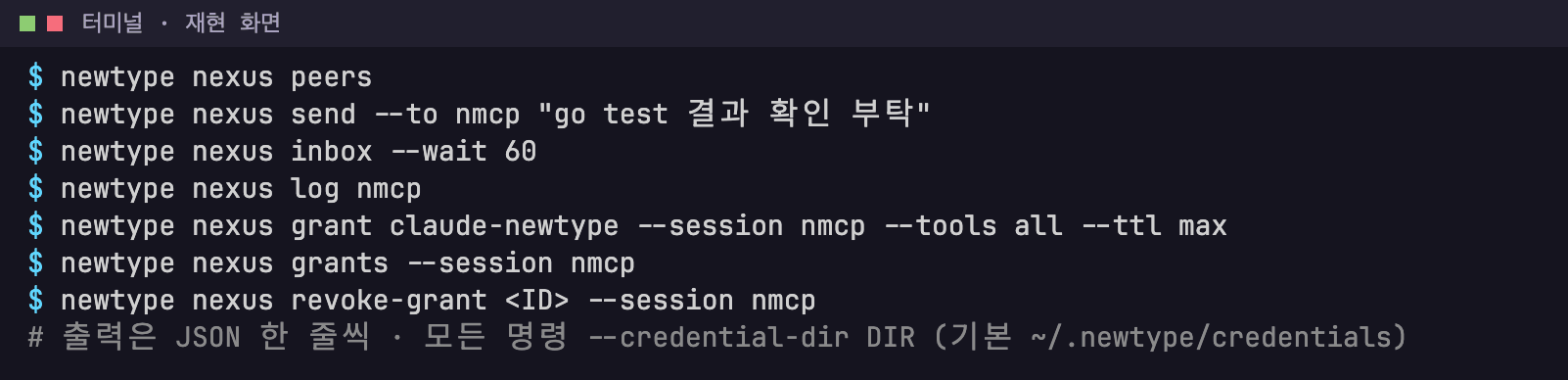
newtype nexus subcommand examples (reconstructed).Screen text
$ newtype nexus peers
$ newtype nexus send --to nmcp "go test 결과 확인 부탁"
$ newtype nexus inbox --wait 60
$ newtype nexus log nmcp
$ newtype nexus grant claude-newtype --session nmcp --tools all --ttl max
$ newtype nexus grants --session nmcp
$ newtype nexus revoke-grant <ID> --session nmcp
# 출력은 JSON 한 줄씩 · 모든 명령 --credential-dir DIR (기본 ~/.newtype/credentials)
newtype release is the operator's offline release-signing tool; regular users don't need it.